
When you give Claude unclear instructions, it uses context and reasoning to interpret your intent. But ambiguity – like vague, underspecified, or conflicting prompts – can lead to errors, inefficiency, or irrelevant responses. Here’s what you need to know:
- Types of Ambiguity: Claude struggles with vague terms ("Make this better"), missing details ("Write about taxes"), or contradictions ("Be concise but detailed").
- How Claude Responds: It guesses intent based on context, defaults to safe assumptions, or asks for clarification. For high-stakes tasks, it prioritizes safety and transparency.
- Improving Results: Write clear, detailed prompts. Include goals, audience, format, and constraints (e.g., "Draft a 2-page report for U.S. executives in plain English").
- When to Let Claude Ask: For complex or critical tasks, allow Claude to clarify before proceeding to avoid costly mistakes. For example, specify, "Ask up to 3 questions if anything is unclear."
Precise instructions save time, reduce errors, and ensure Claude delivers relevant, actionable responses.
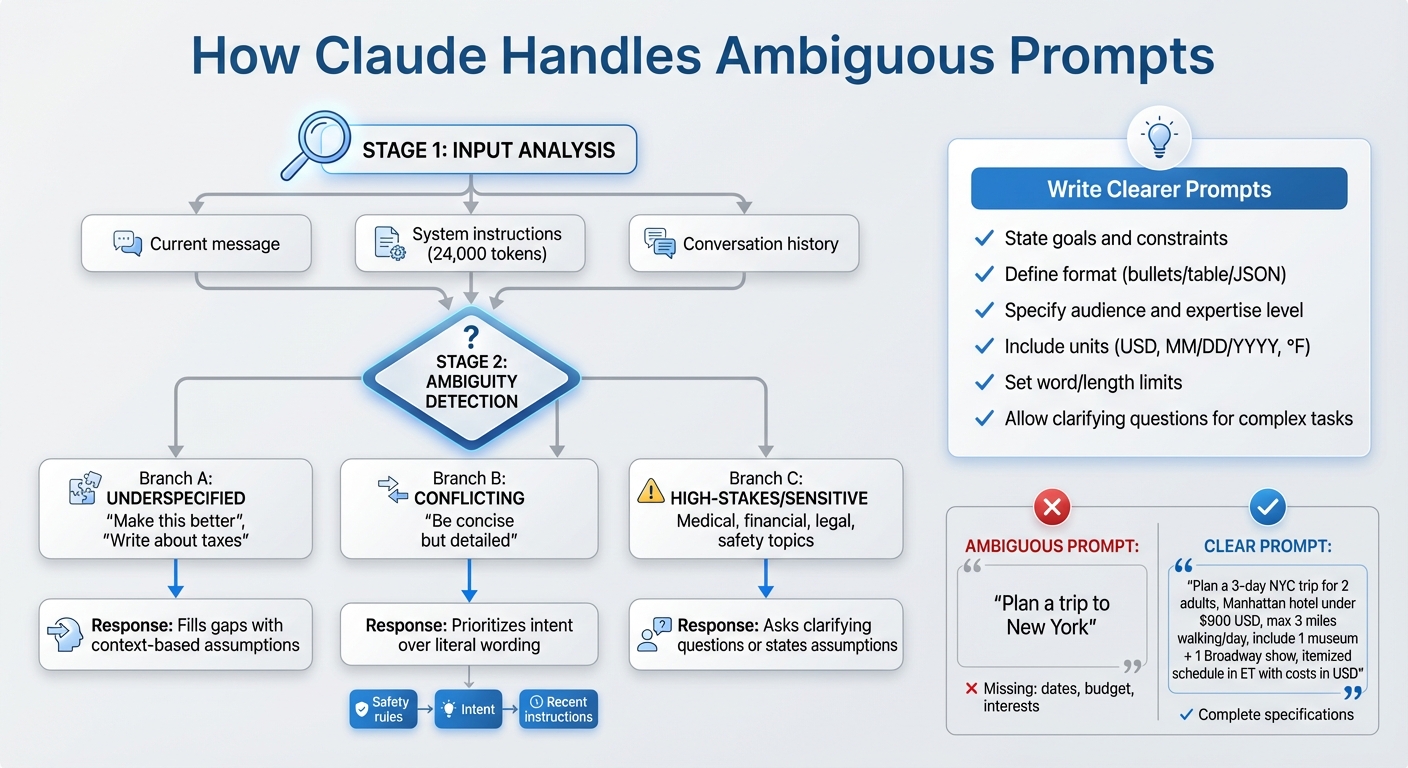
How Claude Interprets Ambiguous Prompts: A Decision Flow
How Claude Interprets Unclear Inputs

Using Context and Conversation History
Claude relies on three key elements to understand vague prompts: your current message, any system or developer instructions running in the background, and the full history of the conversation. For example, if you type something brief like "Summarize this", Claude uses the surrounding context to figure out what you mean. It checks system instructions to determine the tone and format, then assumes you want a concise summary of the text you just provided.
In longer conversations, Claude combines the current input, system instructions, and its memory of prior exchanges to stay on track and interpret unclear requests. Let’s say you initially ask for "a marketing email draft for our new product" and later follow up with "shorter, and more formal." Claude understands that you’re asking for a revision of the same email, not starting a fresh task. Similarly, if you’ve been discussing investment risks and then say, "run the numbers again", Claude connects "numbers" to the last set of calculations it presented. Thanks to its ability to process thousands of tokens at once, Claude can track references, resolve pronouns, and maintain continuity. However, this long memory can also carry over earlier assumptions, which might influence later responses unless you reset the context explicitly. When the information is still unclear, Claude defaults to the most likely interpretation.
Default Behaviors When Facing Ambiguity
When a prompt is vague but seems safe, Claude makes an educated guess about the intent and responds briefly, sticking closely to what was asked. This behavior aligns with its system-level instructions, which emphasize preserving the user’s framing, avoiding unnecessary corrections, and keeping answers concise unless more detail is explicitly requested.
Claude also avoids nitpicking over minor wording issues or derailing the conversation. Its internal system prompt – spanning roughly 24,000 tokens of hidden instructions – advises against correcting user terminology unless absolutely necessary. Constant corrections can come across as "preachy and annoying", so if you use "ROI" when you actually mean "margin", Claude will likely stick with your term while inferring your intent from the context, unless the distinction is critical to the answer’s accuracy or safety. If you want Claude to correct such terms, you can include specific instructions like "correct any misuse of terms" in your prompt. This approach highlights how Claude handles ambiguity while maintaining a smooth interaction.
Safety and Clarification Strategies
When dealing with sensitive or high-stakes topics, Claude takes extra precautions to clarify intent. It adopts a cautious approach for prompts that could involve self-harm, violence, illegal activities, medical advice, or financial decisions where missing context could lead to harmful outcomes. For example, a vague message like "I want to end this" is treated with care – Claude might respond with supportive language and provide resource referrals rather than interpreting the statement literally.
If Claude decides to proceed despite uncertainty, it often outlines its assumptions and limits its response to what it can confidently address. For instance, if you ask, "How should I price my product?" without sharing details about your market or costs, Claude might say, "Because you haven’t specified your industry, audience, or costs, I’ll provide general pricing frameworks", and then explain methods like cost-plus or value-based pricing. Guidance from Anthropic and AWS suggests encouraging Claude to say "I don’t know" or "I don’t have enough information" when appropriate, which helps reduce the risk of fabricated details and leads to more honest, partial answers. You can also guide Claude by adding instructions like, "If anything is unclear, ask me up to three clarifying questions before you answer", which prompts it to seek more details instead of making assumptions. These strategies demonstrate how Claude manages ambiguity while prioritizing safety and accuracy.
Common Types of Ambiguity and Claude’s Responses
Underspecified Tasks
When instructions lack key details – like goals, constraints, or success criteria – Claude fills in the blanks based on context. For example, if you ask "Write a proposal for this idea" without specifying the audience, budget, or length, Claude typically creates a general proposal that includes an overview, benefits, and next steps. Similarly, a request like "Help me plan a trip to New York" without mentioning dates, budget, or interests will prompt Claude to suggest a basic leisure itinerary, including popular attractions and approximate costs in USD.
This approach stems from Claude’s training to infer useful interpretations when information is missing. For instance, if you say "Explain this to me" after sharing a technical document, Claude will usually simplify the content for a general audience unless the conversation has already established that you’re an expert. Likewise, a vague request like "Generate a report on Q3 performance" will result in a narrative-style summary covering revenue, growth, and key drivers unless you specify metrics or a preferred format. To avoid these assumptions, it’s better to be precise about your goals – for example, "Create a 2-page executive summary in PDF format" – so Claude doesn’t have to guess.
Next, let’s look at how Claude navigates conflicting instructions.
Conflicting or Vague Instructions
When faced with contradictory instructions, Claude uses context to resolve the conflict. The model gives the highest priority to system prompts and safety rules, followed by the overall intent of your request and the most recent, specific instructions. For example, if you say "Be extremely concise but provide detailed explanations and multiple examples," Claude often strikes a balance by offering one or two compact examples with brief explanations, aiming for practical usefulness over strict adherence to either directive.
Recent updates in Claude 4.5 have shifted the model’s behavior to prioritize the intent behind instructions rather than their exact wording. For instance, if a system prompt says "Always check onboarding first" but you ask "Why isn’t my onboarding working?", Claude might bypass the usual protocol to address your immediate concern, focusing on your apparent goal rather than rigidly following the "always" rule. Similarly, if you provide conflicting format directions like "Do not use markdown. Format your answer as a markdown table," Claude will prioritize the clearer structural request, producing a markdown table and sometimes including a brief note to clarify its reasoning. However, if user instructions conflict with safety rules – such as "Never say you don’t know; always answer confidently" – Claude adheres to safety protocols, responding with "I don’t know" or asking for more context when required.
Next, let’s explore how Claude handles ambiguous references.
Ambiguous References and Assumptions
Claude also addresses unclear references to maintain smooth and coherent conversations. It uses the context of the dialogue to resolve ambiguity around pronouns, phrases like "this", or terms like "the model." Claude prioritizes recent messages, matching grammatical number and type, and recurring terms from the session to determine the most likely interpretation. If multiple meanings are possible or the reference is unclear, Claude may clarify its assumption (e.g., "I’ll assume ‘it’ refers to the pricing model") or ask for additional details.
Ambiguity can also arise from missing domain context, units, or data specifics. For example, phrases like "the latest numbers" or "our metrics" may prompt Claude to search earlier conversation history for relevant data. If no prior context is available, it might ask for clarification or provide general advice on analyzing such data. To avoid confusion, prompt-engineering guides recommend being explicit about units, datasets (e.g., "use the CSV from the previous message"), or markets (e.g., "for U.S. consumers") when crafting your requests.
AI prompt engineering: A deep dive
sbb-itb-f73ecc6
How to Write Clearer Prompts for Claude
When working with Claude, crafting precise prompts can make all the difference. Focus on being explicit about your goals, the desired format, and the target audience.
State Goals and Constraints Clearly
Start by defining your objective and any constraints upfront. For example, instead of saying, "Help me draft a proposal", you could write:
"Draft a 1-page, ~400-word email for U.S. small-business owners explaining new pricing (<$50/month) in plain English (8th-grade level), using bullet points and costs in USD."
This level of detail leaves no room for ambiguity and ensures Claude understands exactly what you’re aiming for.
Be specific about key details like currency (e.g., "under $500 total" or "budget: $2,000–$3,000"), date formats (MM/DD/YYYY), time zones (e.g., "2:00 p.m. ET"), and measurements in U.S. customary units (miles, pounds, feet, and Fahrenheit). For added clarity, you can include a localization block:
"Assume all currency is in US dollars (use $ and comma separators like $12,500.75), dates follow MM/DD/YYYY format, temperatures are in °F, distances in miles, and weights in pounds."
Here’s how specificity changes a prompt:
- Ambiguous: "Plan a weekend trip to New York."
- Clear: "Plan a 3-day weekend trip to New York City for 2 adults, staying in Manhattan, total hotel budget under $900 (in USD), walking no more than 3 miles per day, with at least one museum and one Broadway show. Provide an itemized daily schedule with times in Eastern Time and approximate costs in US dollars."
Research and user feedback show that detailed prompts like these produce more accurate and useful outputs, reducing the need for revisions.
Define Format and Level of Detail
Make it clear how you want the response to be structured. Whether it’s paragraphs, bullet points, numbered steps, tables, or JSON, spell it out:
"Answer as: 1) a brief summary (2–3 sentences), 2) a numbered checklist of steps, 3) a final ‘Do/Don’t’ bullet list."
For technical tasks, such as working with data or APIs, provide specific instructions:
"Return only valid JSON with these keys: ‘title’, ‘summary’, ‘action_items’ (array of strings). Do not include commentary outside the JSON."
You should also specify the level of detail, the audience’s expertise, and any length requirements. For instance:
"Explain this for a non-technical manager in the U.S., in 4–6 short bullet points, avoiding jargon."
By being clear about structure and depth, you’ll save time and get responses that align with your needs.
Clarify Audience and Domain
Always include details about the intended audience, such as their role, knowledge level, and location. A practical example might look like this:
"Write a one-page explainer for U.S. parents with no legal background about how 504 plans work in public schools in the U.S., using simple language and concrete examples, and avoiding state-specific nuances unless they apply nationwide."
For specialized areas, briefly describe the context and any key constraints or assumptions. For example:
"You are advising a U.S. fintech startup that operates only in the U.S. market, subject to U.S. consumer finance rules, not EU regulations. Focus on U.S. considerations and do not reference GDPR or EU law."
Or for technical scenarios:
"Assume we are working in a Python 3.11 codebase deployed on AWS, using PostgreSQL, and serving U.S. enterprise customers."
For recurring tasks, you might even create a reusable template:
"Task: [describe what you want]. Goal: [single-sentence outcome]. Constraints: [budget in USD, time frame in US dates, measurement units, word limits]. Audience: [role, expertise level, US location or nationwide]. Format: [bullets/steps/table/JSON], length: [approx. word or bullet count]. Tone: [formal/neutral/friendly]. Assumptions: [what to assume, what to avoid]."
When precision is critical – like in client communications, financial details, or legal and regulatory contexts – lock down units (USD, miles, °F), formats (MM/DD/YYYY with time zones), and the scope of regulations (U.S. vs. international). Explicit audience details ensure Claude tailors the output appropriately, paving the way for further refinement through clarifying questions.
When to Let Claude Ask for Clarification
Let’s talk about when it’s a good idea to allow Claude to ask clarifying questions. While clear prompts are essential, there are situations – especially high-stakes or complex ones – where giving Claude the green light to ask questions can avoid costly mistakes. For tasks involving critical decisions or multi-step processes, encouraging questions can lead to more accurate and safer outcomes.
High-Stakes Decisions
When dealing with financial, legal, health, or safety-related scenarios, even small misunderstandings can lead to big consequences. Anthropic suggests that Claude should be empowered to say, "I don’t know", or ask for more details instead of making risky assumptions.
For example, with financial decisions, a vague prompt like "Tell me how to invest $25,000" is far too open-ended. A better approach would be:
"I’m in the U.S. and need help exploring ways to invest $25,000. Before making suggestions, ask me about my time horizon, risk tolerance, current accounts, and tax considerations. If you’re not qualified to offer specific advice, make that clear."
This way, Claude can ask about important factors like whether the money is for retirement or a short-term goal.
Legal and regulatory questions require similar precision. Instead of asking, "Is this contract enforceable?" you might say:
"I’m in California and need general, non-professional insight on this contract. Ask clarifying questions about the parties involved, jurisdiction, and goals before commenting. Also, make it clear that this isn’t legal advice."
This ensures Claude can gather critical context, such as whether the issue involves employment law or interstate agreements.
For safety-critical tasks, avoid ambiguous requests like "How do I insulate my attic?" Instead, try:
"Provide general safety guidelines for insulating a U.S. home attic. Before detailing steps, ask about my experience level, house type, climate, and available tools. Flag anything that might be unsafe for a beginner."
This approach prevents Claude from assuming you have professional-level skills and ensures safety is prioritized.
Complex Multi-Step Workflows
When tackling multi-step tasks like project planning, data analysis, or designing processes, early misunderstandings can snowball into major issues. If you don’t specify key details – such as budget, timeline, or tools – Claude might create plans that look polished but don’t align with your actual needs.
For instance, instead of saying, "Create a 3-month project plan for launching a new feature", you could write:
"Draft a 3-month project plan for launching a new feature. Before starting, ask clarifying questions about team size, roles, time zones, tech stack, budget in USD, target date, and success metrics."
This ensures Claude tailors the plan appropriately, whether it’s for a small startup team or a larger enterprise.
Similarly, data analysis tasks benefit from clear parameters. Instead of "Analyze our sales data and suggest optimizations", consider:
"Help analyze our U.S. sales data. Before recommending methods, ask about the data format, history length, key KPIs, tools (e.g., Excel, SQL, BI platform), and the decisions this analysis will support."
This way, Claude can propose solutions that fit your tools and goals, like using pivot tables for Excel users or SQL queries for database teams.
How to Encourage Targeted Questions
To keep clarifications concise and on point, give Claude clear instructions for asking questions:
- "Before answering, list up to 5 clarifying questions that would help you provide a more accurate response. Ask them one at a time and wait for my reply."
- "If critical details like audience, deadline, budget, or tools are missing, ask targeted follow-up questions instead of guessing."
- "Start by summarizing what you think my goal is in 1–2 sentences. Then ask any questions needed to confirm or adjust your understanding before proceeding."
You can also set limits to keep things focused:
"Ask no more than 3 clarifying questions, prioritizing those that will most affect the quality of your response."
or
"Only ask about factors that significantly impact your recommendation, like budgets over $1,000, legal jurisdiction, safety requirements, or deadlines."
These strategies ensure Claude’s questions are relevant and efficient, helping you get the most accurate and tailored advice.
Conclusion
Final Thoughts on Prompt Design
Anthropic’s Claude works best when given clear, well-defined instructions and explicit permission to address any ambiguity. It’s crucial to include details like currency, date formats, and measurement units that align with U.S. standards. Leaving these details to Claude’s interpretation can result in missed context or errors specific to U.S. conventions. By crafting precise prompts and allowing space for clarification, you can achieve more accurate and dependable outcomes.
Think of prompt design as instruction crafting rather than simply asking questions. When you clearly state your objective, provide all necessary inputs, define the desired format and level of detail, specify your U.S. audience, and address potential ambiguities, you’re essentially programming Claude’s behavior using natural language. This structured approach reduces the need for revisions, speeds up the process, and delivers outputs that are ready to use. It also lays the groundwork for creating task-specific prompts that yield consistent results.
Making the Most of Claude’s Capabilities
Start with a common U.S.-focused task, like writing business emails or summarizing market data, and rework your prompt using a detailed checklist. Test your new structured prompt against a quick, unrefined version in an A/B comparison. Evaluate clarity, accuracy, and how much editing each version requires. Once you’ve identified the better approach, save it as a reusable template and tweak it as needed.
Adopt a simple rule: "If the task is high-stakes or unclear, let Claude ask clarifying questions before proceeding." For routine tasks with predictable formats, provide more specific instructions upfront. For complex, high-stakes, or compliance-heavy tasks, encourage Claude to seek clarification first. This approach balances efficiency with precision, giving you speed when it’s needed and caution when it’s critical.
As your strategies evolve and Claude’s capabilities improve, continue refining your prompts. Resources like Anthropic’s Claude (https://claude3.pro) offer regular updates, guides, and benchmarks to help you stay ahead as tools and best practices develop.
FAQs
How can I write clear and effective prompts for Claude?
To get the most out of Claude, focus on being clear and specific with your prompts. Clearly outline what you’re asking for, and if necessary, include some context or examples to guide the AI’s response. Avoid using vague or overly broad language, and stick to one task at a time to ensure Claude can fully grasp your request.
For instance, instead of saying, "Tell me about history", try something more focused, like, "Can you summarize the major events of the American Revolution?" Clear and well-thought-out prompts result in more accurate and helpful responses.
How does Claude manage conflicting instructions?
Claude relies on a mix of ethical guidelines, sophisticated reasoning, and constitutional AI principles to handle conflicting instructions effectively. It carefully examines the context of the input, prioritizing responses that reflect human values while maintaining clarity and fairness in its output.
This balanced approach helps Claude deliver thoughtful and consistent answers, even when dealing with unclear or contradictory prompts.
When should I let Claude ask follow-up questions?
Letting Claude ask follow-up questions can be a game-changer when your input isn’t crystal clear, lacks detail, or could be interpreted in different ways. These follow-ups help Claude better understand what you’re aiming for, leading to responses that are more accurate and aligned with your needs.
By giving room for clarification, you cut down on potential miscommunication and boost the quality of the output – especially for tasks that are intricate or require a lot of detail. Of course, providing as much context as possible from the start can reduce the need for these follow-up exchanges.