
Claude‘s ability to track context ensures your conversations stay relevant and coherent, even as they grow more complex. Here’s a quick breakdown of how it works:
- Single Session Context: Claude uses a token-based memory system, with limits ranging from 200,000 to 1 million tokens, depending on the model. It summarizes older messages to stay within these limits, ensuring smooth, uninterrupted chats.
- Cross-Session Handling: Claude doesn’t automatically remember past conversations. However, tools like session IDs, chat history, and external memory systems help users maintain continuity.
- Memory Tools for Paid Users: Features like automatic daily summaries and retrieval-augmented searches help save key insights across sessions.
- External Systems: Options like Markdown files or third-party tools provide nearly unlimited storage, real-time updates, and cross-platform flexibility for managing context.
Whether you’re managing projects, coding, or multitasking across platforms, Claude’s context management tools can save you time and effort. Keep reading for practical tips and strategies to make the most of these features.
How Claude Manages Context in a Single Session

Context Window and Token Limits
Claude’s context window acts as its memory during a conversation. Most Claude models, like 3.5 and 3.7 Sonnet, feature a 200,000-token limit, while newer versions, such as Claude Sonnet 4 and 4.5, expand this to a 1-million-token window. Each message you send and every response Claude provides uses up tokens. When the token limit is reached, older messages are removed to make space for new ones.
The latest models, like Claude 4.5, can monitor their remaining "token budget" in real-time. This feature helps manage long tasks more efficiently, avoiding the need to guess how much memory is left. For paid users with code execution enabled, Claude summarizes older messages as it nears the token limit, ensuring the conversation continues smoothly. Additionally, if you’re using Claude Sonnet 3.7 or newer and exceed the token window, you’ll receive a validation error instead of silently losing data.
Let’s explore what Claude retains during a single session.
What Claude Remembers During a Session
During an active chat, Claude retains a variety of inputs, including uploaded text, images, and PDFs. It also remembers your instructions, examples, and any permissions you’ve granted for tools like file editing or web searches.
In specialized environments like Claude Code, the session tracks additional details such as background processes, shell IDs, and file activities. For example, you can launch a Python server, leave the chat, and return later to find the session intact, with the server still running.
"For a model, lacking context awareness is like competing in a cooking show without a clock. Claude 4.5 models change this by explicitly informing the model about its remaining context." – Anthropic
To preserve tokens, extended thinking blocks are removed after each turn, leaving room for essential content. This session memory is key to Claude’s ability to handle long-term context within a single session.
Now let’s look at some real-world examples of how this works.
Single-Session Context Examples for U.S. Users
Developers tested Claude Code’s ability to maintain session context by starting a Python HTTP server (python3 -m http.server 8080) in a bash shell. After exiting and using the --continue command, the session successfully preserved the shell ID, kept the process running, and allowed incremental output checks without reloading the entire buffer.
Anthropic also tested Claude’s context editing capabilities for agents conducting extensive web searches. The system automatically removed outdated search results as the session progressed, enabling agents to complete a 100-turn workflow that would have otherwise failed due to context limits. This approach reduced token usage by 84%.
For complex coding projects, Claude combines memory tools with context editing. For instance, when nearing a 100,000-token threshold, Claude summarizes code changes into a memory file. If the server clears old tool results to save space, Claude uses this memory file to recall which files were already modified. This feature minimizes repetitive inputs, making workflows smoother for U.S. users.
Claude now has memory
How Claude Handles Context Across Different Sessions
Claude operates with a stateless design, meaning it doesn’t automatically remember past conversations when you start a new session. Each interaction begins with a blank slate unless you take deliberate steps to reintroduce prior context, such as re-uploading files, re-pasting instructions, or explaining preferences again. Unlike human memory, Claude doesn’t retain information across sessions, making external tools essential for maintaining continuity.
Platform Session IDs and Chat History
To help manage context, Claude’s web interface, mobile apps, and developer tools use session identifiers. These IDs allow the platform to retrieve and reload previous conversation history when you revisit an ongoing chat on claude.ai.
For users on Pro, Max, Team, or Enterprise plans, Claude offers a Memory feature. This feature automatically synthesizes key insights from your chat history every 24 hours, capturing details like your role, coding preferences, or project specifics. These insights are then integrated into new standalone sessions, so Claude can adapt to your style without requiring manual input. Additionally, you can ask Claude to search through past conversations using Retrieval-Augmented Generation (RAG), which enables the model to pull relevant information into your current chat.
Developers working with the Claude Agent SDK can use a session_id from the initial system message and a resume option to maintain full context across conversations. This includes background processes. For local setups, Claude Code stores session data in a sessions.db file, while the web interface handles sessions server-side.
Model-Level Memory Limits
Despite these features, Claude lacks built-in long-term memory. Tools like the Memory feature and chat search are external solutions designed to compensate for the model’s stateless nature – they’re not part of Claude’s core architecture. Anthropic clarifies that Claude processes all conversation details within a single context buffer, without separating short-term, long-term, or user profile memory.
As discussed in the Context Window and Token Limits section, Claude uses a sliding window mechanism to manage context. This means older messages are discarded once token limits are reached, even during extended conversations. Without enabling the Memory feature or setting up Projects, users must manually reintroduce context for each new session.
sbb-itb-f73ecc6
Methods for Maintaining Context Across Sessions
Since Claude operates without retaining context between sessions, it’s crucial to actively save key details to ensure continuity. For Pro and Enterprise users, Claude generates a memory summary every 24 hours. At the end of a session, you can ask Claude to summarize important decisions – such as coding standards or database choices – and then save this summary in a Markdown file (e.g., CLAUDE.md) to immediately capture the essentials. In fact, one CTO noted that using persistent memory reduced the time spent re-explaining context by a whopping 80%. Below are some effective strategies to preserve session details and integrate them into future interactions.
Summarization and External Storage
Many developers rely on a CLAUDE.md file stored at the project root to maintain shared architecture notes for their team. Alternatively, a ~/.claude/CLAUDE.md file can be used to save personal preferences across multiple projects. For larger initiatives, it’s helpful to break down instructions into topic-specific files, such as testing.md or api-design.md, and organize them within a .claude/rules/ directory. This method keeps the context clear and focused. When writing instructions, be specific. For instance, say "Use 2-space indentation" instead of something vague like "Format code properly".
Anthropic highlights the importance of this approach:
"Assume Interruption: Your context window might be reset at any moment, so you risk losing any progress that is not recorded in your memory directory".
For API users, a beta memory tool allows Claude to create, read, update, and delete files in a /memories directory hosted on your own infrastructure. This feature enables knowledge to persist across conversations. When combined with context editing, this tool has been shown to improve agent performance by 39% in handling complex, multi-step tasks.
Third-Party Memory and Sync Tools
External tools that use the Model Context Protocol (MCP) offer another way to provide Claude with persistent memory through a JSON-based knowledge graph. Unlike standard chat histories, these systems enable semantic search, allowing Claude to retrieve specific details without needing to process entire transcripts. Brent W. Peterson, an entrepreneur and AI enthusiast, described the impact:
"MCP memory transforms Claude from a stateless assistant into a project partner that learns and remembers".
These tools operate on the client side, giving users full control over data privacy and retention. They work well alongside Claude’s native features, ensuring a seamless and unified context across sessions.
Using Fello AI for Cross-Session Context
Beyond Claude’s built-in methods, third-party applications can further enhance continuity. Fello AI (https://claude3.pro) is a popular all-in-one AI platform that provides access to Claude and other leading models like GPT-5.1, Gemini, Grok, and DeepSeek on Mac, iPhone, and iPad. While Fello AI doesn’t add native memory functionality to Claude, it offers a unified interface across devices. This makes it easy to maintain external notes or memory systems that sync through iCloud or other cloud storage solutions. Whether you’re working on a MacBook or reviewing notes from your iPhone, Fello AI ensures your context files are always within reach.
Built-In Context vs. External Memory Systems
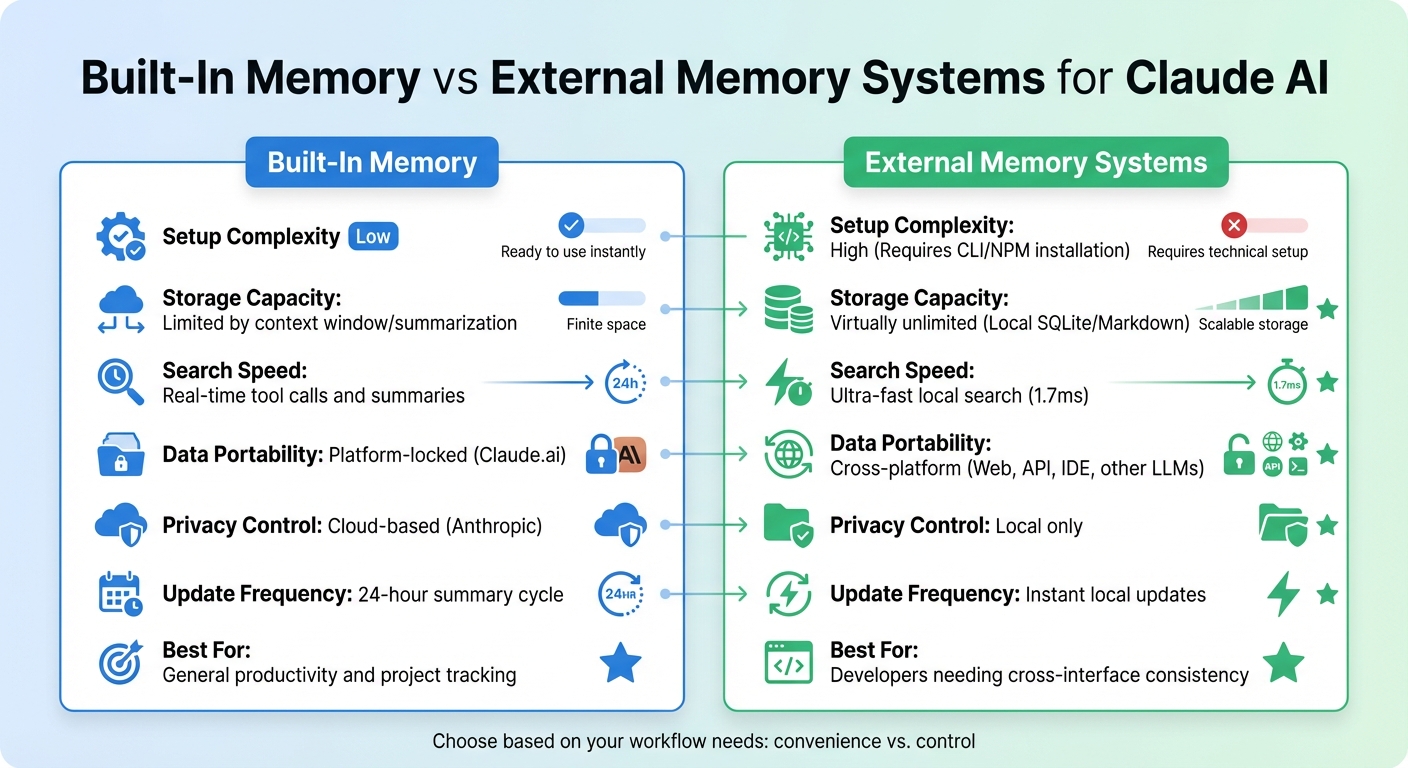
Built-In Memory vs External Memory Systems for Claude AI
When managing Claude’s memory, the decision boils down to a trade-off between ease of use and control. Claude’s built-in memory provides effortless, auto-summarized continuity, making it perfect for project-specific tasks without the hassle of managing separate files. On the other hand, external systems like MCP Nova give you full ownership of your data, allowing local storage (e.g., SQLite or Markdown files) that works seamlessly across web UI, Claude Code, and API environments.
While the built-in memory is convenient, external systems offer greater flexibility and control. One key advantage is portability. External systems enable you to carry your context across different AI platforms. As Justin Johnson, the author of the Continuum memory system, puts it:
"The gap isn’t memory within a single interface. It’s portability across interfaces. Three interfaces, three separate context systems, no portability between them".
This portability is especially useful for developers juggling multiple tools – like CLI, IDE, and API – ensuring that your "voice" and project details stay consistent across platforms.
Performance is another factor to consider, particularly for power users. External systems like MCP Nova can search over 50,000 entries in just 1.7 milliseconds, with an average response time of 131 milliseconds. In contrast, built-in memory relies on daily summaries and real-time tool calls (e.g., conversation_search) to retrieve information. While this approach is sufficient for most users, developers working on autonomous agents or managing workflows that exceed even a 1 million token context window may find the virtually unlimited storage of client-side systems indispensable.
Comparison Table: Pros and Cons
| Feature | Built-In Memory | External Memory Systems |
|---|---|---|
| Setup Complexity | Low | High (Requires CLI/NPM installation) |
| Storage Capacity | Limited by context window/summarization | Virtually unlimited (Local SQLite/Markdown) |
| Search Speed | Real-time tool calls and summaries | Ultra-fast local search (1.7ms) |
| Data Portability | Platform-locked (Claude.ai) | Cross-platform (Web, API, IDE, other LLMs) |
| Privacy Control | Cloud-based (Anthropic) | Local only |
| Update Frequency | 24-hour summary cycle | Instant local updates |
| Best For | General productivity and project tracking | Developers needing cross-interface consistency |
If your work is mostly confined to Claude.ai and you value seamless project continuity, built-in memory is an excellent choice. However, if you need to maintain a consistent identity across multiple platforms, prioritize privacy, or manage agentic workflows requiring real-time updates and extended storage, external systems are the way to go.
Ultimately, this decision highlights the balance between convenience and control. Understanding these options allows you to tailor context management to your specific workflow needs as you navigate multiple sessions.
Conclusion
Claude’s context tracking is built on a layered system that balances short-term reasoning with long-term continuity. Within a single session, the context window functions like working memory, while techniques such as context editing and, when needed, conversation compaction ensure efficiency. Beyond individual sessions, Claude employs three main strategies: automated chat memory that summarizes key insights every 24 hours for paid users, retrieval-augmented searches of past conversations, and persistent file systems managed through the Memory Tool. These methods collectively cut token usage by up to 84% in extended workflows.
These features offer practical advantages tailored to different user needs. For general productivity, Claude’s built-in memory synthesis keeps your professional context up to date automatically. Developers working with long-running agents or requiring cross-platform compatibility can benefit from external systems like the Memory Tool, which provides unlimited storage and real-time updates. This flexibility also appeals to users who need smooth integration across multiple devices.
Anthropic highlights the importance of this approach:
"Context management solves this in two ways, helping developers ensure only relevant data stays in context and valuable insights get preserved across sessions." – Anthropic
For those who prioritize flexibility across AI platforms, tools like Fello AI offer a unified interface to access Claude alongside other leading models on Mac, iPhone, and iPad. These tools work in harmony with Claude’s native memory features, enhancing cross-platform workflow continuity.
FAQs
How does Claude keep track of context across multiple sessions?
Claude is designed to keep track of conversations across sessions using its memory tool or chat search feature. To pick up where you left off, simply use the same session ID and commands like --continue or --resume. This way, the conversation history, stored memories, and any active tools or file states remain intact.
To get the most out of this feature, provide clear prompts or context when resuming a session. On platforms like Fello AI, you can even switch effortlessly between Claude and other models, ensuring smooth continuity for tasks such as writing, brainstorming, or conducting research.
How can external memory systems improve Claude’s performance across sessions?
External memory systems enable Claude to retain context across multiple interactions, making conversations smoother and more efficient. By saving important details – like project specifics, user preferences, or results from earlier tools – Claude can recall relevant information without you needing to repeat yourself. This not only saves time but also reduces token usage and ensures a more seamless experience.
For workflows that involve multiple steps or long-term tasks, external memory is especially useful. It keeps track of key details, such as file references, prior decisions, or background processes, while filtering out less critical information. This means Claude can maintain continuity, allowing you to pick up right where you left off without starting from scratch.
Using an all-in-one AI app like Fello AI takes this convenience even further. It enables you to access Claude’s memory features across devices like Mac, iPhone, and iPad, while also letting you switch effortlessly between other leading AI models.
How does Claude keep track of important details during a single session?
Claude leverages its context window to keep track of your entire session history, ensuring it remembers the important details as your interaction progresses. When the token limit gets close to being reached, it smartly trims less relevant or older information while preserving the most important facts. This approach helps keep the conversation focused without losing key context.
For those wanting to get more out of Claude and other AI tools, apps like Fello AI offer a convenient way to access Claude along with other advanced features. Available on Mac, iPhone, and iPad, this platform makes it simple to use AI for tasks such as writing, brainstorming, and conducting research.